

Ask any bursar what takes up their week and fee reconciliation comes near the top. A parent pays to the school Paybill but types the wrong account number. Another pays a relative's child's fees by mistake. A third sends a screenshot on WhatsApp and the bursar has to match it to the bank statement by hand.
M-Pesa STK push fixes most of this.
What STK push is
STK push (Safaricom calls it Lipa na M-Pesa Online) lets the school's system send a payment request straight to the parent's phone. The parent sees the school's name and the amount, enters their M-Pesa PIN, and the payment is done. They never type the Paybill number or the account number.
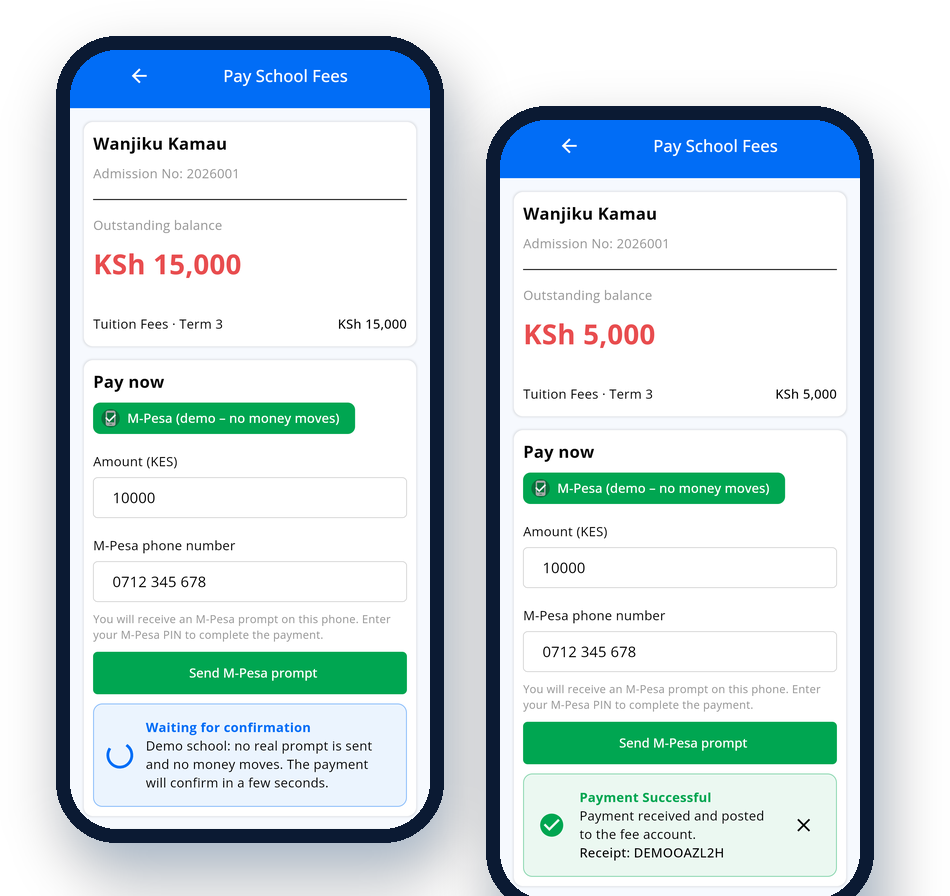
From the parent's side, it takes three steps:
- Open Pay School Fees in the parent portal and see the balance for each term.
- Enter the amount and their Safaricom number, then tap Send M-Pesa prompt.
- Approve the prompt with their PIN. The receipt appears in the portal at once.
From the bursar's side, the payment arrives with the learner's admission number attached, so it posts to the right fee statement and the school's accounts with no manual matching.
Paybill or Till?
Both work with STK push:
- Paybill suits most schools. Payments carry an account reference (Class Compass uses the learner's admission number), which keeps statements tidy.
- Till (Buy Goods) is simpler to open and fine for small schools, canteens or uniform shops.
Either way, the money goes straight to the school's own account. Class Compass never holds school funds.
Setting it up
To accept STK push you need API credentials for your Paybill or Till from the Safaricom Daraja portal:
- Create a Daraja account and an app.
- Test with the sandbox credentials first.
- Apply to go live for your Paybill or Till, which gives you production credentials and a passkey.
- Enter the shortcode, consumer key, consumer secret and passkey in Settings → Payment gateways in Class Compass, choose Sandbox or Production, and switch M-Pesa on.
Each school enters its own credentials. A school's keys are visible only to that school's administrators.
Part payments and balances
Most parents pay in instalments. A good system should:
- accept any amount up to the outstanding balance;
- credit each payment to the oldest unpaid term first;
- show the parent their new balance immediately;
- refuse overpayments, or hold them as credit, so the bursar doesn't have to refund.
Class Compass does all four. The bursar sees every payment, its M-Pesa receipt number and the learner it was posted to, in one list.
Keeping parents safe
Fee scams are common, so tell parents clearly:
The school will never ask for your M-Pesa PIN by phone or SMS. Only enter it on your own phone when the prompt appears after you requested it.
Put this on the fee structure, the school website and the parent portal.
Try it
The Class Compass live demo lets you sign in as a parent and pay fees by M-Pesa from start to finish. In the demo no real prompt is sent and no money moves, so you can see exactly what parents will see.